
Statistics for Bioinformatics

Learning Goals
By the end of this chapter, you should be able to:
- Explain key statistical concepts used in bioinformatics.
- Interpret p-values and multiple-testing corrections correctly.
- Understand why FDR control is essential for omics studies.
- Use PCA for exploratory analysis of high-dimensional data.
The Language of Evidence
Bioinformatics is data-driven. When we observe a difference—say, gene A is expressed more in tumor cells than normal cells—we need to know if this difference is real or just random noise. Statistics provides the framework to quantify this uncertainty.
Hypothesis Testing and the P-value
The core of statistical inference is Hypothesis Testing.
- Null Hypothesis ($H_0$): There is no difference between the groups (e.g., Drug has no effect).
- Alternative Hypothesis ($H_1$): There is a difference.
What is a P-value?
The p-value is one of the most misunderstood concepts in science.
- Definition: The probability of observing your data (or something more extreme) assuming the Null Hypothesis is true.
- It is NOT: The probability that the Null Hypothesis is true.
- Interpretation: A low p-value (typically < 0.05) means the data is very surprising if there were no real effect. Therefore, we reject the Null Hypothesis.
Common Tests
- Student’s t-test: Compares the means of two groups (e.g., Treated vs. Control).
- ANOVA: Compares means of 3+ groups.
- Fisher’s Exact Test: Tests associations between categorical variables (e.g., Gene Set Enrichment).
- Wilcoxon/Mann-Whitney U: Non-parametric rank-based test (doesn’t assume normality).
- Chi-squared test: Tests independence between categorical variables.
Practical Examples in R
# === t-test Example ===
# Compare gene expression between two conditions
set.seed(42)
control <- c(5.2, 4.8, 5.5, 5.1, 4.9, 5.3)
treated <- c(7.8, 8.2, 7.5, 8.1, 7.9, 8.0)

# Two-sample t-test (assumes equal variance)
t.test(control, treated, var.equal = TRUE)

# Welch's t-test (does not assume equal variance - recommended)
t.test(control, treated)

# Paired t-test (before/after on same samples)
before <- c(100, 120, 110, 115, 105)
after <- c(95, 110, 100, 105, 98)
t.test(before, after, paired = TRUE)

# === Non-parametric: Wilcoxon Test ===
# Use when data isn't normally distributed
wilcox.test(control, treated)

# === ANOVA: Comparing 3+ Groups ===
group_A <- rnorm(10, mean = 5, sd = 1)
group_B <- rnorm(10, mean = 7, sd = 1)
group_C <- rnorm(10, mean = 5.5, sd = 1)

data <- data.frame(
  expression = c(group_A, group_B, group_C),
  group = factor(rep(c("A", "B", "C"), each = 10))
)

# One-way ANOVA
aov_result <- aov(expression ~ group, data = data)
summary(aov_result)

# Post-hoc test: which groups differ?
TukeyHSD(aov_result)

# === Chi-squared / Fisher's Exact Test ===
# Test: Are mutations enriched in one group?
contingency <- matrix(c(15, 5, 8, 22), nrow = 2,
                      dimnames = list(c("Mutated", "Wild-type"),
                                    c("Cases", "Controls")))
# Chi-squared (for large samples)
chisq.test(contingency)

# Fisher's exact (for small samples - preferred in genomics)
fisher.test(contingency)
Type I and Type II Errors
| Reject $H_0$ | Fail to Reject $H_0$ | |
|---|---|---|
| $H_0$ True | Type I Error (α) | Correct |
| $H_0$ False | Correct (Power) | Type II Error (β) |
- Type I Error (α): False positive - calling something significant when it’s not
- Type II Error (β): False negative - missing a real effect
- Power = 1 - β: Probability of detecting a true effect
Power Analysis
Before running an experiment, estimate the sample size needed:
library(pwr)

# How many samples per group to detect a "medium" effect?
# Effect size d = 0.5, power = 0.8, alpha = 0.05
pwr.t.test(d = 0.5, sig.level = 0.05, power = 0.8, type = "two.sample")
# Result: n = 64 per group

# For RNA-seq differential expression
# Rule of thumb: 3 replicates minimum, 6+ for low-expression genes
# Use RNASeqPower package for precise calculations
library(RNASeqPower)
rnapower(
  depth = 20,       # millions of reads per sample
  cv = 0.4,         # coefficient of variation
  effect = 2,       # fold change to detect
  alpha = 0.05,
  power = 0.8
)
Effect Sizes: Beyond P-values
P-values don’t tell you the magnitude of an effect. Always report effect sizes:
# Cohen's d for t-tests
library(effectsize)
cohens_d(treated, control)

# For gene expression: Log2 Fold Change
# log2FC = 1 means 2x higher, log2FC = -1 means 2x lower
mean_control <- mean(control)
mean_treated <- mean(treated)
log2FC <- log2(mean_treated / mean_control)
print(paste("Log2 Fold Change:", round(log2FC, 2)))

# Effect size interpretation
# |d| = 0.2: small effect
# |d| = 0.5: medium effect
# |d| = 0.8: large effect
The Z-Score (Standard Score)
Often in bioinformatics (especially for heatmaps), we need to compare genes that have vastly different expression levels.
The Z-score standardizes data by centering it around 0 and scaling it by the variance. \(Z = \frac{x - \mu}{\sigma}\) Where $\mu$ is the mean and $\sigma$ is the standard deviation.
- Z = 0: The value is exactly average.
- Z = +2: The value is 2 standard deviations above average (highly expressed).
- Z = -2: The value is 2 standard deviations below average (low expression).
This allows us to see relative patterns of “up” and “down” regulation across all genes simultaneously.
The Multiple Testing Problem and FDR
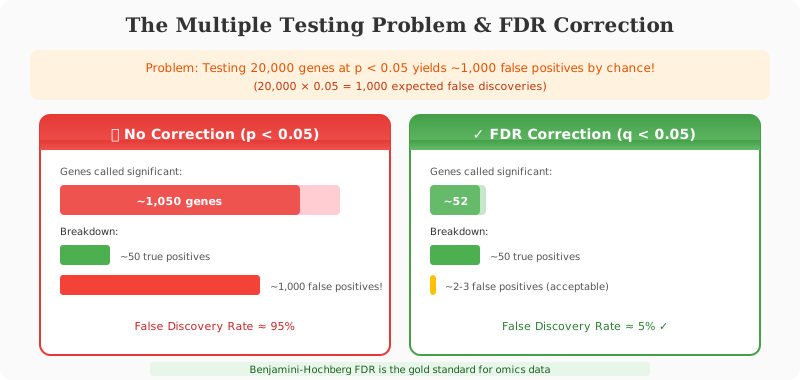
In bioinformatics, we often test thousands of genes simultaneously (e.g., in RNA-Seq or GWAS).
If you test 20,000 genes with a p-value cutoff of 0.05, you expect $20,000 \times 0.05 = 1,000$ false positives by chance alone!
False Discovery Rate (FDR)
To fix this, we apply Multiple Testing Correction. The standard method in omics is controlling the FDR.
- Bonferroni Correction: Very strict. Tries to prevent any false positives. (Cutoff becomes $0.05 / 20,000$). Often too strict for biology, causing us to miss real discoveries (False Negatives).
- FDR (Benjamini-Hochberg): Less strict. It controls the proportion of false discoveries. An FDR of 0.05 means “Of all the genes we call significant, we expect 5% to be false positives.” This is the gold standard for high-throughput data.
Dimensionality Reduction: PCA
Omics data is high-dimensional (thousands of genes per sample). Principal Component Analysis (PCA) reduces this complexity by finding new axes (Principal Components) that capture the most variance in the data.
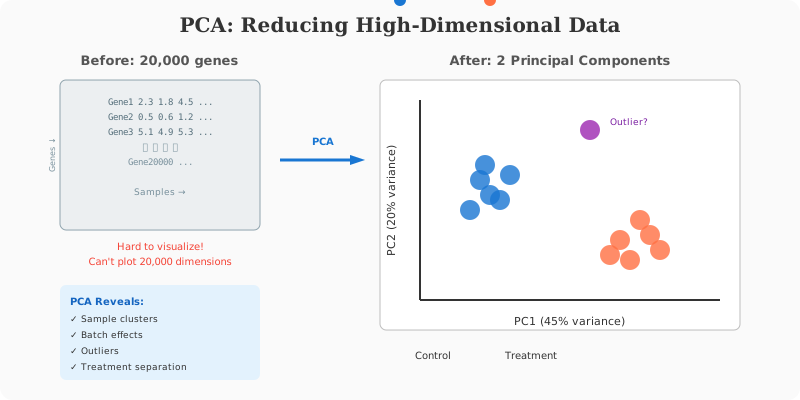
- PC1: Captures the most variation.
- PC2: Captures the second most.
Plotting samples on PC1 vs. PC2 allows us to see clusters, batch effects, or outliers instantly.
Bioinformatics in Action: Stats with R
R is the language of statistics. Let’s simulate a gene expression experiment and see the difference between raw p-values and FDR correction.
# 1. Simulate Data
# 1000 genes, 2 groups (Control, Treatment)
set.seed(42)
p_values <- numeric(1000)

for (i in 1:1000) {
  # Generate random data for Control group (Mean=10)
  control <- rnorm(10, mean = 10, sd = 2)

  # For the first 50 genes, make treatment different (True Positives, Mean=14)
  if (i <= 50) {
    treatment <- rnorm(10, mean = 14, sd = 2)
  } else {
    # For the rest, no difference (Null cases, Mean=10)
    treatment <- rnorm(10, mean = 10, sd = 2)
  }

  # Perform t-test
  test_result <- t.test(control, treatment)
  p_values[i] <- test_result$p.value
}

# 2. Naive P-value counting
# How many "significant" genes if we just use p < 0.05?
significant_naive <- sum(p_values < 0.05)
print(paste("Significant genes (p < 0.05):", significant_naive))

# 3. FDR Correction (Benjamini-Hochberg)
# Adjust the p-values
p_adjusted <- p.adjust(p_values, method = "BH")
significant_fdr <- sum(p_adjusted < 0.05)

print(paste("Significant genes (FDR < 0.05):", significant_fdr))
Output:
Significant genes (p < 0.05): 93
Significant genes (FDR < 0.05): 48
Notice how the naive method found 93 significant genes (many false positives), while FDR correction narrowed it down to 48 (closer to the true 50).
Linear Models and Regression
Linear models are the foundation of most bioinformatics statistics, including limma for microarrays and DESeq2’s internals.
Simple Linear Regression
# Relationship between gene expression and drug concentration
concentration <- c(0, 1, 2, 5, 10, 20, 50)
expression <- c(5.1, 5.8, 6.2, 8.1, 10.5, 15.2, 22.8)

# Fit linear model
model <- lm(expression ~ concentration)
summary(model)

# Key outputs:
# - Coefficients: intercept and slope
# - R-squared: proportion of variance explained
# - p-value: is the relationship significant?

# Visualize
plot(concentration, expression, pch = 19,
     main = "Dose-Response Curve",
     xlab = "Drug Concentration (µM)",
     ylab = "Gene Expression")
abline(model, col = "red", lwd = 2)
Multiple Regression with Covariates
In real experiments, you need to account for confounders:
# Gene expression depends on treatment AND batch
data <- data.frame(
  expression = c(5.2, 5.5, 7.8, 8.0, 5.8, 6.0, 8.5, 8.8),
  treatment = factor(c("Control", "Control", "Treated", "Treated",
                       "Control", "Control", "Treated", "Treated")),
  batch = factor(c("A", "A", "A", "A", "B", "B", "B", "B"))
)

# Model with both variables
model <- lm(expression ~ treatment + batch, data = data)
summary(model)

# ANOVA to test significance of each factor
anova(model)

# Get treatment effect while controlling for batch
library(emmeans)
emmeans(model, pairwise ~ treatment)
Generalized Linear Models (GLMs)
For non-normal data (counts, proportions):
# Count data: Poisson regression
mutation_counts <- c(0, 1, 0, 3, 2, 5, 8, 12, 15)
exposure <- c(1, 1, 1, 5, 5, 10, 10, 20, 20)

glm_pois <- glm(mutation_counts ~ exposure, family = poisson())
summary(glm_pois)

# Binary outcomes: Logistic regression
# Disease status vs. gene expression
disease <- c(0, 0, 0, 0, 1, 1, 1, 1)
marker <- c(2.1, 2.5, 3.0, 2.8, 5.5, 6.2, 5.8, 7.0)

glm_logit <- glm(disease ~ marker, family = binomial())
summary(glm_logit)

# Odds ratio
exp(coef(glm_logit)["marker"])
# Interpretation: for each unit increase in marker, odds of disease increase by X
Batch Effect Detection and Correction
Batch effects are systematic technical differences between experimental batches that can mask or mimic biological signals.
Detecting Batch Effects
library(ggplot2)

# PCA to visualize batch effects
pca <- prcomp(t(expression_matrix), scale = TRUE)
pca_df <- data.frame(
  PC1 = pca$x[, 1],
  PC2 = pca$x[, 2],
  Batch = metadata$batch,
  Condition = metadata$condition
)

# Color by batch - if samples cluster by batch, you have a problem
ggplot(pca_df, aes(PC1, PC2, color = Batch, shape = Condition)) +
  geom_point(size = 4) +
  theme_minimal() +
  labs(title = "PCA: Check for Batch Effects")
Correcting Batch Effects
# Method 1: Include batch in your model (preferred for DE analysis)
# DESeq2 automatically handles this
design <- ~ batch + condition

# Method 2: ComBat for visualization/clustering
library(sva)
batch <- metadata$batch
modcombat <- model.matrix(~ condition, data = metadata)

# Combat correction
corrected <- ComBat(dat = expression_matrix,
                    batch = batch,
                    mod = modcombat,
                    par.prior = TRUE)

# Method 3: limma's removeBatchEffect (for visualization only!)
library(limma)
corrected_vis <- removeBatchEffect(expression_matrix,
                                    batch = metadata$batch,
                                    design = model.matrix(~ condition, data = metadata))
# WARNING: Only use corrected data for visualization, NOT for DE testing
Survival Analysis
Common in cancer genomics: does a gene predict patient survival?
library(survival)
library(survminer)

# Kaplan-Meier survival curves
# Create survival object
surv_obj <- Surv(time = clinical$os_months, event = clinical$status)

# Stratify by gene expression (high vs. low)
clinical$gene_group <- ifelse(clinical$gene_expression > median(clinical$gene_expression),
                               "High", "Low")

# Fit survival curves
fit <- survfit(surv_obj ~ gene_group, data = clinical)

# Plot Kaplan-Meier curves
ggsurvplot(fit, data = clinical,
           pval = TRUE,              # Add log-rank p-value
           risk.table = TRUE,        # Add risk table
           conf.int = TRUE,          # Confidence intervals
           palette = c("#E74C3C", "#3498DB"),
           title = "Overall Survival by BRCA1 Expression")

# Cox proportional hazards regression
# Test gene expression as continuous variable, adjusting for age
cox_model <- coxph(surv_obj ~ gene_expression + age + stage, data = clinical)
summary(cox_model)

# Hazard ratio interpretation
# HR > 1: higher expression = higher risk
# HR < 1: higher expression = protective
# HR = 1: no effect
Correlation Analysis
Pearson vs. Spearman
# Pearson: linear relationships, sensitive to outliers
cor(gene_A, gene_B, method = "pearson")
cor.test(gene_A, gene_B, method = "pearson")

# Spearman: rank-based, robust to outliers and non-linearity
cor(gene_A, gene_B, method = "spearman")
cor.test(gene_A, gene_B, method = "spearman")

# Correlation matrix for multiple genes
library(corrplot)
cor_matrix <- cor(expression_data, method = "spearman")
corrplot(cor_matrix, method = "color", type = "upper",
         tl.cex = 0.8, tl.col = "black")
Gene-Gene Correlation Networks
library(WGCNA)

# Soft thresholding power selection
powers <- c(1:20)
sft <- pickSoftThreshold(datExpr, powerVector = powers, verbose = 5)

# Build correlation network
softPower <- 6
adjacency <- adjacency(datExpr, power = softPower)
TOM <- TOMsimilarity(adjacency)
dissTOM <- 1 - TOM

# Hierarchical clustering
geneTree <- hclust(as.dist(dissTOM), method = "average")

# Module detection
dynamicMods <- cutreeDynamic(dendro = geneTree, distM = dissTOM,
                              deepSplit = 2, pamRespectsDendro = FALSE,
                              minClusterSize = 30)
Bayesian Statistics in Bioinformatics
Many modern tools use Bayesian approaches:
# Simple Bayesian A/B test
library(BayesFactor)

# Compare gene expression between conditions
bf <- ttestBF(x = treated, y = control)
print(bf)
# BF > 3: moderate evidence for difference
# BF > 10: strong evidence
# BF > 100: very strong evidence

# Bayesian linear regression
bf_model <- lmBF(expression ~ treatment + batch, data = data)
Empirical Bayes in limma
limma uses empirical Bayes to “borrow strength” across genes:
library(limma)

# Design matrix
design <- model.matrix(~ 0 + condition, data = metadata)
colnames(design) <- levels(metadata$condition)

# Fit linear model
fit <- lmFit(expression_matrix, design)

# Define contrasts
contrasts <- makeContrasts(
  TreatedVsControl = Treated - Control,
  levels = design
)
fit2 <- contrasts.fit(fit, contrasts)

# Empirical Bayes moderation
# This shrinks variance estimates toward a common value
# Genes with few replicates get more reliable estimates
fit2 <- eBayes(fit2)

# Get results
results <- topTable(fit2, coef = "TreatedVsControl", number = Inf)
Non-parametric Methods
When assumptions of normality are violated:
# Kruskal-Wallis (non-parametric ANOVA)
kruskal.test(expression ~ group, data = data)

# Post-hoc: Dunn's test
library(dunn.test)
dunn.test(data$expression, data$group, method = "bh")

# Permutation test
# Compute observed difference
obs_diff <- mean(treated) - mean(control)

# Permutation null distribution
n_perm <- 10000
perm_diffs <- numeric(n_perm)
combined <- c(treated, control)
n1 <- length(treated)

for (i in 1:n_perm) {
  shuffled <- sample(combined)
  perm_diffs[i] <- mean(shuffled[1:n1]) - mean(shuffled[(n1+1):length(combined)])
}

# Permutation p-value
p_perm <- mean(abs(perm_diffs) >= abs(obs_diff))
print(paste("Permutation p-value:", p_perm))
Summary
Statistics allows us to separate signal from noise. In bioinformatics, understanding p-values, multiple testing correction (FDR), and exploratory techniques like PCA is essential for interpreting high-throughput data correctly. Beyond basics, mastering linear models, batch effect correction, and survival analysis will make you a confident bioinformatics analyst.
💬 Give Feedback
Help us improve! Share what worked, what was unclear, or suggest new topics.
Share Your Feedback