
Single-Cell and Spatial Omics Analysis

Single-cell and spatial omics let you answer two core biological questions at once: which cell states exist, and where they are located in tissue.
Learning Goals
By the end of this chapter, you should be able to:
- Explain core concepts in single-cell and spatial omics workflows.
- Run a basic scRNA-seq analysis pipeline from quality control to annotation.
- Understand batch correction and integration strategies across datasets.
- Perform differential expression and pathway interpretation by cell type.
- Connect spatial context to cell-state biology for stronger interpretation.
Why This Path Matters
Bulk omics averages signals across many cell types. Single-cell and spatial omics preserve heterogeneity and tissue architecture, which is critical for:
- Tumor microenvironment profiling.
- Immune response mapping.
- Developmental trajectory studies.
- Precision biomarker discovery.
Core Data Types
scRNA-seq
- Measures transcript abundance per individual cell.
- Typical output: gene-by-cell count matrix + metadata.
Spatial Transcriptomics
- Measures expression in physical tissue coordinates.
- Typical output: expression matrix + spot coordinates + histology image.
Optional companion modalities
- CITE-seq (RNA + surface proteins).
- scATAC-seq (chromatin accessibility).
- Multiome (paired RNA + ATAC).
Recommended Analysis Workflow
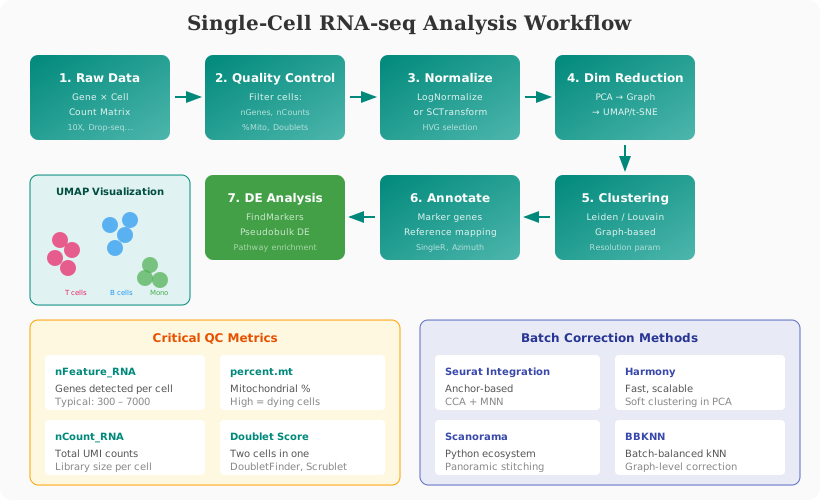
1) Experimental Design and Metadata
Capture this before analysis:
- Sample groups and contrasts.
- Batch sources (patient, run date, chemistry, site).
- Tissue region, disease stage, treatment metadata.
- Expected cell populations and known markers.
Bad metadata design causes major downstream interpretation errors.
2) Quality Control (QC)
Typical QC metrics:
- Number of detected genes per cell (
nFeature_RNA). - Total counts per cell (
nCount_RNA). - Mitochondrial percentage (
percent.mt). - Doublet probability.
Example (Seurat, R)
library(Seurat)

obj <- CreateSeuratObject(counts = counts_matrix, project = "sc_project")
obj[["percent.mt"]] <- PercentageFeatureSet(obj, pattern = "^MT-")

# Example thresholds; tune per dataset
obj <- subset(
  obj,
  subset = nFeature_RNA > 300 &
           nFeature_RNA < 7000 &
           percent.mt < 15
)
3) Normalization and Feature Selection
Common practice:
- Library-size normalization (
LogNormalize) orSCTransform. - Identify highly variable genes.
- Scale data before dimensionality reduction.
obj <- NormalizeData(obj)
obj <- FindVariableFeatures(obj, selection.method = "vst", nfeatures = 3000)
obj <- ScaleData(obj)
4) Dimensionality Reduction and Clustering
- PCA for compact representation.
- Graph construction.
- Cluster assignment.
- UMAP/t-SNE visualization.
obj <- RunPCA(obj, npcs = 50)
obj <- FindNeighbors(obj, dims = 1:30)
obj <- FindClusters(obj, resolution = 0.5)
obj <- RunUMAP(obj, dims = 1:30)
DimPlot(obj, reduction = "umap", label = TRUE)
5) Cell Type Annotation
Use three complementary strategies:
- Canonical marker genes (manual curation).
- Reference mapping (Azimuth/SingleR/celltypist).
- Marker-driven confidence scoring.
markers <- FindAllMarkers(obj, only.pos = TRUE, min.pct = 0.25, logfc.threshold = 0.25)
head(markers)
6) Batch Correction and Multi-Sample Integration
When integrating cohorts or sites, compare methods:
- Seurat integration anchors.
- Harmony.
- Scanorama / BBKNN (Python ecosystem).
Goal: remove technical effects while preserving biology.
# Harmony example sketch
library(harmony)
obj <- RunHarmony(obj, group.by.vars = "batch")
obj <- RunUMAP(obj, reduction = "harmony", dims = 1:30)
7) Differential Expression and Pathway Analysis
Run contrasts at the right level:
- Cell type-specific DE (preferred).
- Pseudobulk DE by sample and cell type for robust inference.
- Enrichment with GO/KEGG/Reactome.
Idents(obj) <- "celltype"
de_tcells <- FindMarkers(obj, ident.1 = "T_cell_treated", ident.2 = "T_cell_control")
head(de_tcells)
8) Spatial Transcriptomics Integration
Use spatial data to validate where cell states localize.
Key analyses:
- Spatial clustering.
- Spot deconvolution using scRNA-seq references.
- Region-specific pathway signatures.
Example sketch (Seurat spatial)
spatial <- Load10X_Spatial(data.dir = "spatial_sample/")
spatial <- SCTransform(spatial, assay = "Spatial", verbose = FALSE)
spatial <- RunPCA(spatial)
spatial <- RunUMAP(spatial, dims = 1:30)
SpatialFeaturePlot(spatial, features = c("EPCAM", "COL1A1"))
Spatial Omics Deep Dive
Spatial omics is revolutionizing how we understand tissue biology. This section covers the major technologies and complete analysis workflows.
Spatial Technologies Overview
| Technology | Resolution | Genes | Key Features |
|---|---|---|---|
| 10x Visium | 55µm spots | Whole transcriptome | FFPE compatible, widely adopted |
| 10x Visium HD | 2µm bins | Whole transcriptome | Near single-cell resolution |
| 10x Xenium | Subcellular | 100-500 panel | Imaging-based, true single-cell |
| MERFISH | Subcellular | 100-10000 panel | High multiplexing |
| CosMx SMI | Subcellular | 1000+ panel | RNA + protein |
| Slide-seq | ~10µm | Whole transcriptome | Barcoded beads |
| Stereo-seq | ~500nm | Whole transcriptome | Very high resolution |
Complete Visium Analysis Pipeline
R Workflow (Seurat)
library(Seurat)
library(ggplot2)
library(patchwork)

# Load 10x Visium data
spatial <- Load10X_Spatial(
  data.dir = "visium_sample/",
  filename = "filtered_feature_bc_matrix.h5",
  slice = "tissue1"
)

# QC metrics
spatial[["percent.mt"]] <- PercentageFeatureSet(spatial, pattern = "^MT-")
VlnPlot(spatial, features = c("nCount_Spatial", "nFeature_Spatial", "percent.mt"),
        pt.size = 0)

# View histology
SpatialDimPlot(spatial)

# Filter spots
spatial <- subset(spatial,
                  subset = nFeature_Spatial > 200 &
                           nFeature_Spatial < 8000 &
                           percent.mt < 25)

# Normalization with SCTransform (recommended for spatial)
spatial <- SCTransform(spatial, assay = "Spatial", verbose = FALSE)

# Dimensionality reduction
spatial <- RunPCA(spatial, assay = "SCT", verbose = FALSE)
spatial <- FindNeighbors(spatial, reduction = "pca", dims = 1:30)
spatial <- FindClusters(spatial, resolution = 0.8)
spatial <- RunUMAP(spatial, reduction = "pca", dims = 1:30)

# Visualize clusters on tissue
p1 <- SpatialDimPlot(spatial, label = TRUE, label.size = 3)
p2 <- DimPlot(spatial, reduction = "umap", label = TRUE)
p1 + p2

# Gene expression on tissue
SpatialFeaturePlot(spatial,
                   features = c("KRT17", "EPCAM", "CD3D", "COL1A1"),
                   pt.size.factor = 1.5,
                   crop = TRUE)

# Interactive visualization
SpatialFeaturePlot(spatial, features = "KRT17", interactive = TRUE)
Python Workflow (Scanpy/Squidpy)
import scanpy as sc
import squidpy as sq
import matplotlib.pyplot as plt

# Load Visium data
adata = sc.read_visium("visium_sample/")
adata.var_names_make_unique()

# QC
sc.pp.calculate_qc_metrics(adata, inplace=True)
adata = adata[adata.obs["n_genes_by_counts"] > 200, :]

# Normalize
sc.pp.normalize_total(adata, target_sum=1e4)
sc.pp.log1p(adata)

# Highly variable genes
sc.pp.highly_variable_genes(adata, flavor="seurat_v3", n_top_genes=3000)

# Dimensionality reduction
sc.pp.pca(adata)
sc.pp.neighbors(adata)
sc.tl.umap(adata)
sc.tl.leiden(adata, resolution=0.8)

# Spatial visualization
sc.pl.spatial(adata, color="leiden", spot_size=100)
sc.pl.spatial(adata, color=["KRT17", "COL1A1"], spot_size=100)

# Squidpy: Spatial statistics
# Neighborhood enrichment: which clusters neighbor each other?
sq.gr.spatial_neighbors(adata)
sq.gr.nhood_enrichment(adata, cluster_key="leiden")
sq.pl.nhood_enrichment(adata, cluster_key="leiden")

# Co-occurrence analysis
sq.gr.co_occurrence(adata, cluster_key="leiden")
sq.pl.co_occurrence(adata, cluster_key="leiden", clusters="0")
Spot Deconvolution
Visium spots contain multiple cells. Deconvolution estimates cell type proportions per spot.
Cell2location (Python)
import cell2location
from cell2location.utils import select_slide

# Load scRNA-seq reference
adata_ref = sc.read("scRNA_reference.h5ad")

# Estimate reference signatures
# NB regression model estimates cell type expression
from cell2location.models import RegressionModel

# Set up model
cell2location.models.RegressionModel.setup_anndata(
    adata_ref,
    layer="counts",
    batch_key="batch"
)

# Train reference model
ref_model = RegressionModel(adata_ref)
ref_model.train(max_epochs=250)

# Extract signatures
adata_ref = ref_model.export_posterior(
    adata_ref,
    sample_kwargs={'num_samples': 1000}
)
inf_aver = adata_ref.varm['means_per_cluster_mu_fg']

# Now deconvolve spatial data
cell2location.models.Cell2location.setup_anndata(adata_spatial)

model = cell2location.models.Cell2location(
    adata_spatial,
    cell_state_df=inf_aver,
    N_cells_per_location=10,
    detection_alpha=20
)

model.train(max_epochs=30000)

# Add results to adata
adata_spatial = model.export_posterior(adata_spatial)

# Visualize cell type abundances
sc.pl.spatial(adata_spatial,
              color=["T_cells", "Macrophages", "Fibroblasts"],
              spot_size=100)
RCTD (R)
library(spacexr)

# Prepare scRNA-seq reference
reference <- Reference(
  counts = sc_counts,
  cell_types = sc_metadata$celltype
)

# Prepare spatial data
spatialdata <- SpatialRNA(
  coords = spatial_coords,
  counts = spatial_counts
)

# Run RCTD deconvolution
myRCTD <- create.RCTD(spatialdata, reference, max_cores = 8)
myRCTD <- run.RCTD(myRCTD, doublet_mode = "doublet")

# Extract results
results <- myRCTD@results
weights <- results$weights
weights_normalized <- normalize_weights(weights)

# Visualize
plot_weights(weights_normalized, coords = spatial_coords)
Spatial Domain Detection
Identify tissue regions with distinct molecular profiles.
BayesSpace (R)
library(BayesSpace)

# Preprocess
sce <- spatialPreprocess(sce, platform = "Visium", n.PCs = 15)

# Cluster with spatial prior
sce <- spatialCluster(sce, q = 7, platform = "Visium", nrep = 10000)

# Enhance resolution
sce.enhanced <- spatialEnhance(sce, q = 7, platform = "Visium", nrep = 10000)

# Visualize
clusterPlot(sce, palette = scales::hue_pal()(7))
SpaGCN (Python - Graph Neural Network)
import SpaGCN as spg

# Calculate spatial neighbors
adj = spg.calculate_adj_matrix(x=x_array, y=y_array, histology=False)

# Find optimal resolution
res = spg.search_res(adata, adj, l=1.0, target_num=7,
                     start=0.4, step=0.02, max_run=20)

# Cluster
clf = spg.SpaGCN()
clf.set_l(1.0)
clf.train(adata, adj, init="louvain", res=res, num_epoch=200)
pred, prob = clf.predict()

adata.obs["SpaGCN_cluster"] = pred
sc.pl.spatial(adata, color="SpaGCN_cluster")
Imaging-Based Spatial Transcriptomics (Xenium/MERFISH)
Single-molecule resolution with cell segmentation.
Xenium Analysis with Seurat
# Load Xenium data
xenium <- LoadXenium(
  data.dir = "xenium_output/",
  fov = "fov"
)

# Visualize molecules
ImageDimPlot(xenium, fov = "fov", molecules = c("CD3E", "MS4A1", "EPCAM"),
             mols.size = 0.05, mols.alpha = 0.5)

# Cell-level analysis
xenium <- SCTransform(xenium, assay = "Xenium")
xenium <- RunPCA(xenium)
xenium <- FindNeighbors(xenium, dims = 1:30)
xenium <- FindClusters(xenium, resolution = 0.5)

# Visualize cells on tissue
ImageDimPlot(xenium, fov = "fov", cols = "polychrome", size = 0.5)
MERFISH with Squidpy
# Load MERFISH data
adata = sq.read.vizgen(
    "merfish_output/",
    cells_boundaries=True,
    transcripts=True
)

# Visualize
sq.pl.spatial_scatter(adata, color="leiden", library_id="z0")

# Cell segmentation analysis
sq.gr.spatial_neighbors(adata, coord_type="generic")

# Receptor-ligand analysis
sq.gr.ligrec(
    adata,
    n_perms=1000,
    cluster_key="leiden"
)
sq.pl.ligrec(adata, cluster_key="leiden", source_groups="Macrophage")
Cell-Cell Communication Analysis
CellChat spatial mode
library(CellChat)

# Create CellChat object with spatial info
cellchat <- createCellChat(object = seurat_obj,
                           group.by = "celltype",
                           assay = "SCT")

# Add spatial coordinates
cellchat@images <- list(spatial = spatial_coords)

# Use spatial distance weighting
cellchat <- setCellChatDB(cellchat, "CellChatDB.human")
cellchat <- subsetData(cellchat)
cellchat <- identifyOverExpressedGenes(cellchat)
cellchat <- identifyOverExpressedInteractions(cellchat)

# Compute with distance decay
cellchat <- computeCommunProb(cellchat, distance.use = TRUE, scale.distance = 100)
cellchat <- computeCommunProbPathway(cellchat)
cellchat <- aggregateNet(cellchat)

# Visualize
netVisual_spatial(cellchat, signaling = "CXCL", spatial = TRUE)
MISTy (explainer model for spatial interactions)
library(mistyR)

# Define views: intrinsic, neighborhood (paracrine), tissue-level
views <- create_initial_view(expression_matrix) %>%
  add_paraview(positions, l = 10) %>%
  add_juxtaview(positions, neighbor.thr = 15)

# Run MISTy
results <- run_misty(views)

# Interpret contributions
collect_results(results)
plot_interaction_community(results)
Spatial Niche Analysis
# Define microenvironments based on cell type composition
import squidpy as sq
from sklearn.cluster import KMeans

# Get cell type composition per neighborhood
sq.gr.spatial_neighbors(adata, coord_type="generic", delaunay=True)
sq.gr.centrality_scores(adata, cluster_key="leiden")

# Calculate cell type enrichment in local neighborhoods
neighborhood_enrichment = sq.gr.nhood_enrichment(adata, cluster_key="leiden")

# Cluster spots by cell type composition (niches)
ct_composition = adata.obsm["nhood_enrichment"]
kmeans = KMeans(n_clusters=5, random_state=42)
adata.obs["niche"] = kmeans.fit_predict(ct_composition)

sq.pl.spatial_scatter(adata, color="niche")
Best Practices for Reproducibility
- Keep a sample manifest and fixed metadata schema.
- Save intermediate objects (
.rdsor.h5ad) per major step. - Track package versions and parameters.
- Use consistent QC thresholds with documented rationale.
- Separate exploratory from confirmatory analyses.
Common Pitfalls
- Over-filtering rare but biologically important cells.
- Calling clusters as cell types without marker validation.
- Treating batch correction outputs as absolute truth.
- Mixing donor/sample effects with true biological effects.
- Ignoring spatial resolution limitations during interpretation.
Suggested Practice Datasets
- PBMC 3k (Seurat tutorial baseline).
- 10x Visium public datasets for spatial workflows.
- Multi-donor immune datasets for batch/integration practice.
Summary
Single-cell plus spatial omics provides a high-resolution framework to discover cell states, interactions, and tissue context. Strong analysis depends on disciplined QC, robust integration, biologically grounded annotation, and reproducible reporting.
💬 Give Feedback
Help us improve! Share what worked, what was unclear, or suggest new topics.
Share Your Feedback