
Multi-Omics Data Integration

Multi-omics integration combines information from multiple molecular layers to provide a more complete view of biology than any single data type alone.
Learning Goals
By the end of this chapter, you should be able to:
- Explain why multi-omics integration is useful in translational research.
- Design a clean end-to-end integration workflow from raw data to biological interpretation.
- Compare early, intermediate, and late integration strategies.
- Apply practical R/Python code patterns for integration-ready datasets.
- Identify key pitfalls such as batch effects, feature mismatch, and leakage.
Why Multi-Omics?
Single-omics analysis answers narrow questions. Multi-omics helps answer system-level questions:
- Why does a genomic variant change RNA, protein, and metabolite profiles differently?
- Which molecular layer is most predictive of phenotype or clinical outcome?
- Which pathways show consistent dysregulation across layers?
Common layers:
- Genomics (variants, CNVs)
- Transcriptomics (gene expression, isoforms)
- Proteomics (protein abundance, PTMs)
- Metabolomics (small molecules, pathway activity)
- Epigenomics (methylation, chromatin state)
Core Integration Strategies
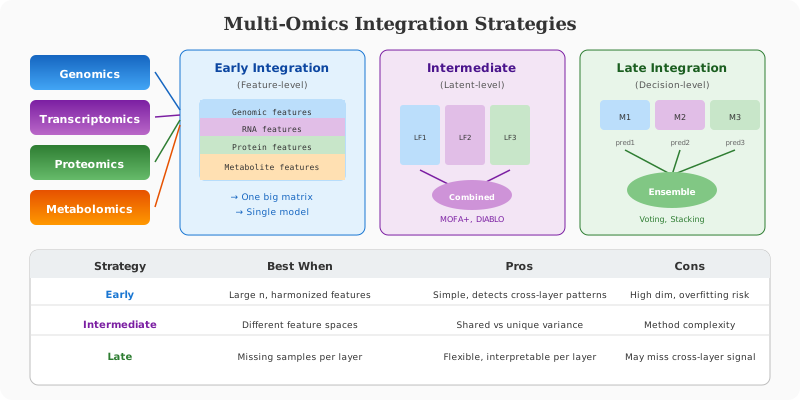
1. Early Integration (Feature-Level)
Concatenate features from all layers into one matrix.
Use when:
- Sample size is high enough.
- Features are harmonized and scaled.
Risk: High dimensionality can overfit quickly.
2. Intermediate Integration (Latent-Level)
Learn compact representations per omics layer, then combine the latent factors.
Use when:
- Each omics type has very different feature spaces.
- You want biologically meaningful hidden factors.
Common tools: MOFA+, iCluster, DIABLO (mixOmics), autoencoders.
3. Late Integration (Decision-Level)
Build models per omics layer and combine predictions.
Use when:
- Layers have missing samples.
- Separate models are easier to interpret operationally.
End-to-End Workflow
Step 1. Define the Biological Question
Examples:
- Biomarker discovery for disease subtypes.
- Mechanistic pathway prioritization.
- Outcome prediction (response/non-response).
Step 2. Harmonize Samples and IDs
Create a shared sample map across omics files.
# Example in R: enforce common samples across omics matrices
common_ids <- Reduce(intersect, list(colnames(rna), colnames(protein), colnames(metabolite)))
rna_common <- rna[, common_ids]
protein_common <- protein[, common_ids]
met_common <- metabolite[, common_ids]
Step 3. Preprocess Each Layer Independently
Minimum checklist:
- Normalize within each omics type.
- Remove low-quality features.
- Handle missing values with method-appropriate imputation.
- Correct batch effects.
# RNA-seq example pattern: log transform after size normalization
rna_log <- log2(rna_common + 1)
# Proteomics example pattern: median center per sample
sample_medians <- apply(protein_common, 2, median, na.rm = TRUE)
global_median <- median(sample_medians, na.rm = TRUE)
protein_norm <- sweep(protein_common, 2, sample_medians - global_median, FUN = "-")
Step 4. Align Features to Biological Knowledge
Link features to gene symbols, pathways, or protein complexes.
# Python pattern: align by shared gene symbol index
import pandas as pd

rna_df = pd.read_csv("rna_matrix.csv", index_col=0)
protein_df = pd.read_csv("protein_matrix.csv", index_col=0)
shared = rna_df.index.intersection(protein_df.index)
rna_shared = rna_df.loc[shared]
protein_shared = protein_df.loc[shared]
Step 5. Choose an Integration Model
Start with one interpretable baseline and one advanced model:
- Baseline: correlation network + pathway enrichment.
- Advanced: latent-factor model (for example MOFA+).
Step 6. Validate Robustly
- Split train/test at the sample level.
- Prevent leakage from normalization/imputation across split boundaries.
- Report external validation if possible.
Integration Methods You Should Know
Correlation-Based Integration
- Simple and interpretable.
- Good for first-pass biological exploration.
Canonical Correlation Analysis (CCA)
- Finds linear relationships between two omics blocks.
- Useful for paired datasets with enough samples.
Partial Least Squares / DIABLO (mixOmics)
- Supervised integration with feature selection.
- Strong option for multi-class biomarker tasks.
Multi-Omics Factor Analysis (MOFA+)
- Unsupervised latent factors.
- Separates shared vs layer-specific variation.
Complete Integration Tutorials
MOFA+ Tutorial (R/Python)
MOFA+ discovers latent factors capturing variance shared or specific to each omics layer.
# Install MOFA+
# devtools::install_github("bioFAM/MOFA2")
library(MOFA2)

# Prepare data as named list
data_list <- list(
  RNA = as.matrix(rna_common),
  Protein = as.matrix(protein_common),
  Methylation = as.matrix(meth_common)
)

# Create MOFA object
mofa_obj <- create_mofa(data_list)

# Set training options
data_opts <- get_default_data_options(mofa_obj)
model_opts <- get_default_model_options(mofa_obj)
model_opts$num_factors <- 15  # Number of latent factors

train_opts <- get_default_training_options(mofa_obj)
train_opts$convergence_mode <- "slow"
train_opts$seed <- 42

# Prepare and train
mofa_obj <- prepare_mofa(
  mofa_obj,
  data_options = data_opts,
  model_options = model_opts,
  training_options = train_opts
)

mofa_obj <- run_mofa(mofa_obj, outfile = "mofa_model.hdf5")

# Explore results
# Variance explained by each factor per view
plot_variance_explained(mofa_obj, max_r2 = 25)

# Factor values (latent representation of samples)
factors <- get_factors(mofa_obj, as.data.frame = TRUE)

# Plot samples in factor space colored by phenotype
plot_factor(mofa_obj, factor = 1, color_by = "condition")

# Get top features for each factor
weights <- get_weights(mofa_obj, views = "all", factors = 1:5, as.data.frame = TRUE)
top_genes <- weights %>%
  filter(view == "RNA") %>%
  group_by(factor) %>%
  slice_max(abs(value), n = 20)

# Pathway enrichment on top factor genes
library(gprofiler2)
enrichment <- gost(query = top_genes$feature, organism = "hsapiens")
mixOmics DIABLO Tutorial (Supervised Multi-Omics)
DIABLO finds sparse multi-omics signatures that discriminate groups.
library(mixOmics)

# Prepare matrices (samples x features)
X_list <- list(
  mRNA = t(rna_common),
  miRNA = t(mirna_common),
  Protein = t(protein_common)
)

# Outcome variable
Y <- as.factor(metadata$condition)

# Design matrix (0 = no correlation, 1 = full correlation between blocks)
design <- matrix(0.1, ncol = length(X_list), nrow = length(X_list),
                 dimnames = list(names(X_list), names(X_list)))
diag(design) <- 0

# Tune number of components and variables
tune_splsda <- tune.block.splsda(
  X = X_list,
  Y = Y,
  design = design,
  ncomp = 5,
  test.keepX = list(
    mRNA = c(10, 30, 50),
    miRNA = c(5, 10, 20),
    Protein = c(10, 30, 50)
  ),
  BPPARAM = BiocParallel::MulticoreParam(workers = 4)
)

# Extract optimal parameters
optimal_keepX <- tune_splsda$choice.keepX

# Train final model
diablo_model <- block.splsda(
  X = X_list,
  Y = Y,
  ncomp = tune_splsda$choice.ncomp$ncomp,
  keepX = optimal_keepX,
  design = design
)

# Visualize results
# Sample plot
plotIndiv(diablo_model, ind.names = FALSE, legend = TRUE,
          title = "DIABLO: Sample Space")

# Arrow plot (connect sample projections across omics)
plotArrow(diablo_model, ind.names = FALSE, legend = TRUE)

# Circos plot (correlations between selected features)
circosPlot(diablo_model, cutoff = 0.7, line = TRUE,
           color.blocks = c("darkorchid", "brown1", "lightgreen"))

# Get selected features
selected_features <- selectVar(diablo_model)
# mRNA: selected_features$mRNA$name
# Protein: selected_features$Protein$name

# Cross-validation performance
perf_diablo <- perf(diablo_model, validation = "Mfold",
                     folds = 5, nrepeat = 10)
plot(perf_diablo)
Similarity Network Fusion (SNF)
SNF combines patient similarity networks from different omics into a unified network.
library(SNFtool)

# Calculate distance matrices for each omics
dist_rna <- dist2(as.matrix(t(rna_common)), as.matrix(t(rna_common)))
dist_protein <- dist2(as.matrix(t(protein_common)), as.matrix(t(protein_common)))
dist_meth <- dist2(as.matrix(t(meth_common)), as.matrix(t(meth_common)))

# Convert to affinity matrices
K <- 20  # Number of neighbors
alpha <- 0.5  # Hyperparameter for kernel

aff_rna <- affinityMatrix(dist_rna, K, alpha)
aff_protein <- affinityMatrix(dist_protein, K, alpha)
aff_meth <- affinityMatrix(dist_meth, K, alpha)

# Fuse networks
fused_network <- SNF(list(aff_rna, aff_protein, aff_meth), K, 20)

# Cluster patients using spectral clustering
num_clusters <- estimateNumberOfClustersGivenGraph(fused_network, NUMC = 2:5)
clusters <- spectralClustering(fused_network, K = num_clusters$`Eigen-gap best`)

# Visualize fused network
displayClusters(fused_network, clusters)

# Compare with individual omics clustering
cluster_rna <- spectralClustering(aff_rna, K = num_clusters$`Eigen-gap best`)
table(clusters, cluster_rna)  # Agreement between fused and RNA-only
Network-Based Integration with WGCNA
library(WGCNA)
allowWGCNAThreads()

# Transpose matrices (samples x genes)
datExpr_rna <- t(rna_common)
datExpr_protein <- t(protein_common)

# Build RNA co-expression network
softPower_rna <- pickSoftThreshold(datExpr_rna, verbose = 5)$powerEstimate
adjacency_rna <- adjacency(datExpr_rna, power = softPower_rna)
TOM_rna <- TOMsimilarity(adjacency_rna)
geneTree_rna <- hclust(as.dist(1 - TOM_rna), method = "average")

# Detect modules
modules_rna <- cutreeDynamic(dendro = geneTree_rna, distM = 1 - TOM_rna,
                              deepSplit = 2, minClusterSize = 30)

# Calculate module eigengenes
MEList_rna <- moduleEigengenes(datExpr_rna, colors = modules_rna)
MEs_rna <- MEList_rna$eigengenes

# Correlate RNA modules with protein expression
moduleTraitCor <- cor(MEs_rna, datExpr_protein, use = "p")
moduleTraitPvalue <- corPvalueStudent(moduleTraitCor, nrow(datExpr_rna))

# Visualize module-protein correlations
library(pheatmap)
pheatmap(moduleTraitCor[, 1:50],  # Top 50 proteins
         clustering_method = "ward.D2",
         main = "RNA Module - Protein Correlations")
Practical Quality Control for Multi-Omics
- Plot missingness by layer and sample.
- Check per-layer variance and outlier samples.
- Visualize batch structure with PCA/UMAP before and after correction.
- Inspect cross-omics concordance for known biology (for example gene-protein pairs).
# Quick missingness check (R)
miss_sample <- colMeans(is.na(protein_norm)) * 100
summary(miss_sample)
Common Pitfalls and How to Avoid Them
- Feature mismatch across layers: map IDs early and document conversion steps.
- Overfitting in high dimensions: use regularization and nested validation.
- Ignoring batch effects: correct per layer, then verify correction worked.
- Blind concatenation: scale/transform before combining matrices.
- Data leakage: preprocess inside training folds only.
Mini Integration Example (Conceptual)
# Assume rna_log, protein_norm, met_common are feature x sample
# 1) Keep common samples
ids <- Reduce(intersect, list(colnames(rna_log), colnames(protein_norm), colnames(met_common)))

X_rna <- t(scale(t(rna_log[, ids])))
X_pro <- t(scale(t(protein_norm[, ids])))
X_met <- t(scale(t(met_common[, ids])))

# 2) Simple early integration baseline
X <- rbind(X_rna, X_pro, X_met)

# 3) Dimensionality reduction and clustering
pca <- prcomp(t(X), center = TRUE, scale. = FALSE)
plot(pca$x[, 1], pca$x[, 2], pch = 19, xlab = "PC1", ylab = "PC2")
Reproducibility Checklist
- Version-control all preprocessing and integration scripts.
- Save parameter files for normalization, imputation, and model tuning.
- Keep a frozen metadata file with sample-to-omics mapping.
- Export QC reports and intermediate matrices for auditability.
- Track package versions (R
sessionInfo(), Pythonpip freeze).
Summary
Multi-omics integration turns disconnected molecular measurements into systems-level biological insight. Strong results depend on disciplined preprocessing, careful feature/sample alignment, robust validation, and clear biological interpretation.
💬 Give Feedback
Help us improve! Share what worked, what was unclear, or suggest new topics.
Share Your Feedback