
Bioinformatics Core Skills

This chapter covers the practical technical skills every bioinformatics learner needs to move from theory to real analysis.
Learning Goals
By the end of this chapter, you should be able to:
- Navigate Linux confidently.
- Inspect and transform text-based biological files.
- Write simple scripts in Python and R.
- Use Git for version control and collaboration.
- Build reproducible workflows.
Linux Command Line Essentials
Most bioinformatics tools run on Linux or Linux-like systems. Mastering the command line is non-negotiable.
Core Navigation Commands
# Where am I?
pwd

# What's here?
ls -la              # Detailed list with hidden files
ls -lh              # Human-readable file sizes

# Move around
cd /path/to/dir     # Absolute path
cd ../              # Up one level
cd ~                # Home directory
cd -                # Previous directory
File Operations
# Create
mkdir -p project/data/raw    # Create nested directories
touch notes.txt              # Create empty file

# Copy and move
cp file.txt backup/          # Copy file
cp -r folder/ backup/        # Copy directory recursively
mv old_name.txt new_name.txt # Rename
mv file.txt destination/     # Move

# Delete (careful!)
rm file.txt                  # Remove file
rm -r folder/                # Remove directory
rm -i file.txt               # Ask before deleting
Viewing and Exploring Files
# Quick looks
head -n 20 file.txt          # First 20 lines
tail -n 20 file.txt          # Last 20 lines
tail -f logfile.txt          # Follow a growing file

# Browse large files
less file.txt                # Navigate with arrows, q to quit
zless file.gz                # Browse compressed files

# File info
wc -l file.txt               # Count lines
file sample.bam              # Detect file type
du -sh folder/               # Directory size
Essential Text Processing
# Search
grep "BRCA1" genes.txt           # Find lines containing pattern
grep -c ">" sequences.fasta      # Count matches
grep -v "^#" file.vcf            # Exclude lines starting with #
grep -E "gene|transcript" file   # Multiple patterns (regex)

# Extract columns
cut -f1,3 data.tsv               # Get columns 1 and 3
cut -d',' -f2 data.csv           # With comma delimiter

# Sort and unique
sort file.txt                    # Alphabetical sort
sort -n numbers.txt              # Numeric sort
sort -k2,2n data.tsv             # Sort by column 2 numerically
uniq                             # Remove adjacent duplicates
sort | uniq -c                   # Count occurrences
AWK for Bioinformatics
AWK is extremely powerful for column-based data processing:
# Print specific columns
awk '{print $1, $3}' file.tsv

# Filter by condition
awk '$5 < 0.05 {print $1}' results.txt    # Genes with p < 0.05

# Calculate sums
awk '{sum += $2} END {print sum}' counts.txt

# Process FASTQ (every 4th line is sequence)
awk 'NR % 4 == 2' sample.fastq | head

# Filter SAM by mapping quality
awk '$5 >= 30' aligned.sam > high_quality.sam

# Convert formats
awk 'BEGIN{OFS="\t"} {print $1, $4-1, $5, $3}' file.gff > file.bed
Sed for Text Manipulation
# Find and replace
sed 's/old/new/g' file.txt           # Replace all occurrences
sed -i 's/old/new/g' file.txt        # In-place editing

# Delete lines
sed '/^#/d' file.vcf                 # Delete comment lines
sed '1d' file.txt                    # Delete first line

# Extract line ranges
sed -n '10,20p' file.txt             # Print lines 10-20
Pipes and Redirection
# Chain commands
cat file.txt | grep "pattern" | sort | uniq -c

# Redirect output
command > output.txt                  # Overwrite
command >> output.txt                 # Append
command 2> error.log                  # Stderr only
command &> all_output.log             # Both stdout and stderr

# Process substitution
diff <(sort file1.txt) <(sort file2.txt)
Example: Inspect a FASTQ File
# View first 2 reads (8 lines)
zcat sample_R1.fastq.gz | head -n 8

# Output:
# @read_001
# ATCGATCGATCGATCGATCGATCGATCGATCG
# +
# IIIIIIIIIIIIIIIIIIIIIIIIIIIIIIII
# @read_002
# GCTAGCTAGCTAGCTAGCTAGCTAGCTAGCTA
# +
# IIIIIIIIIIIIIIIIIIIIIIIIIIIIIIII
Practical Exercise: FASTQ Quality Check
# Count total reads
echo "Total reads: $(( $(zcat sample_R1.fastq.gz | wc -l) / 4 ))"

# Check for adapter contamination (Illumina universal adapter)
zcat sample_R1.fastq.gz | grep -c "AGATCGGAAGAG"

# Get read length distribution
zcat sample_R1.fastq.gz | awk 'NR%4==2 {print length}' | sort | uniq -c

# Extract reads containing a specific sequence
zcat sample_R1.fastq.gz | paste - - - - | grep "ATCGATCG" | tr '\t' '\n'
Working with Bioinformatics File Formats
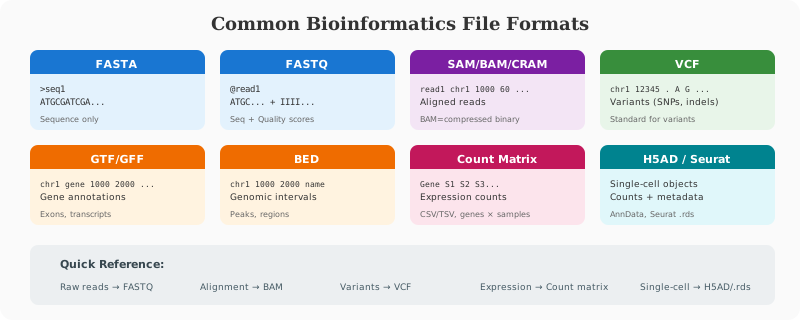
You should know what each format represents:
- FASTA: sequence only
- FASTQ: sequence + quality scores
- SAM/BAM/CRAM: read alignments
- VCF: variants
- GTF/GFF: genomic features
- BED: genomic intervals
Example: Count Reads in a FASTQ
zcat sample_R1.fastq.gz | wc -l
Divide by 4 to estimate number of reads.
Shell Scripting for Automation
If you repeat a task more than once, script it.
#!/usr/bin/env bash
for f in data/*.fastq.gz; do
  echo "Processing $f"
  zcat "$f" | head -n 4
done
Benefits:
- Saves time
- Reduces manual mistakes
- Makes steps reproducible
Python for Data Processing
Python is the Swiss Army knife of bioinformatics—useful for parsing files, building pipelines, and creating analysis utilities.
Essential Libraries
# Data manipulation
import pandas as pd
import numpy as np

# Visualization
import matplotlib.pyplot as plt
import seaborn as sns

# Bioinformatics specific
from Bio import SeqIO          # Biopython for sequences
from Bio.Seq import Seq
import pysam                   # SAM/BAM files
import pyranges as pr          # Genomic intervals
import scanpy as sc            # Single-cell analysis
Example: Read a Tabular Result
import pandas as pd

# Load differential expression results
df = pd.read_csv("deseq_results.csv")

# Quick exploration
print(df.head())
print(f"Total genes: {len(df)}")
print(f"Significant genes (FDR < 0.05): {len(df[df['padj'] < 0.05])}")

# Filter for significant upregulated genes
sig_up = df[(df['padj'] < 0.05) & (df['log2FoldChange'] > 1)]
print(f"Significantly upregulated: {len(sig_up)}")
Working with FASTA Files
from Bio import SeqIO

# Read FASTA file
for record in SeqIO.parse("sequences.fasta", "fasta"):
    print(f"ID: {record.id}")
    print(f"Length: {len(record.seq)}")
    print(f"GC content: {(record.seq.count('G') + record.seq.count('C')) / len(record.seq):.2%}")
    print()

# Write filtered sequences
long_seqs = [r for r in SeqIO.parse("input.fasta", "fasta") if len(r.seq) > 1000]
SeqIO.write(long_seqs, "filtered.fasta", "fasta")
Working with BAM Files
import pysam

# Open BAM file
bam = pysam.AlignmentFile("aligned.bam", "rb")

# Count reads per chromosome
for chrom in bam.references:
    count = bam.count(chrom)
    print(f"{chrom}: {count:,} reads")

# Extract reads from a region
for read in bam.fetch("chr1", 1000000, 1001000):
    print(f"{read.query_name}: {read.mapping_quality}")

bam.close()
Creating Publication-Quality Plots
import pandas as pd
import matplotlib.pyplot as plt
import seaborn as sns

# Load data
df = pd.read_csv("deseq_results.csv")

# Volcano plot
fig, ax = plt.subplots(figsize=(10, 8))

# Color by significance
colors = ['grey' if (p >= 0.05 or abs(l) < 1) else ('red' if l > 0 else 'blue')
          for p, l in zip(df['padj'], df['log2FoldChange'])]

ax.scatter(df['log2FoldChange'], -np.log10(df['padj']), c=colors, alpha=0.5, s=10)
ax.axhline(-np.log10(0.05), color='black', linestyle='--', alpha=0.5)
ax.axvline(-1, color='black', linestyle='--', alpha=0.5)
ax.axvline(1, color='black', linestyle='--', alpha=0.5)

ax.set_xlabel('log2 Fold Change', fontsize=12)
ax.set_ylabel('-log10 adjusted p-value', fontsize=12)
ax.set_title('Differential Expression Volcano Plot', fontsize=14)

plt.tight_layout()
plt.savefig('volcano_plot.png', dpi=300)
Pandas Power Moves for Bioinformatics
import pandas as pd

# Read different formats
df_csv = pd.read_csv("data.csv")
df_tsv = pd.read_csv("data.tsv", sep="\t")
df_excel = pd.read_excel("data.xlsx")

# Handle missing values
df = df.dropna(subset=['gene_id'])           # Drop rows with missing gene_id
df['expression'] = df['expression'].fillna(0) # Fill NA with 0

# Merge datasets (like SQL joins)
merged = pd.merge(expression_df, annotation_df, on='gene_id', how='left')

# Group operations
mean_by_group = df.groupby('condition')['expression'].mean()

# Pivot tables (tall to wide)
wide_df = df.pivot(index='gene', columns='sample', values='count')

# Apply functions
df['log2_expr'] = df['expression'].apply(lambda x: np.log2(x + 1))

# Filter with multiple conditions
filtered = df.query('padj < 0.05 & abs(log2FoldChange) > 1')
R for Statistics and Visualization
R is the dominant language for statistical bioinformatics, especially transcriptomics and genomics.
Core Ecosystem
# Data manipulation (tidyverse)
library(dplyr)
library(tidyr)
library(readr)
library(stringr)

# Visualization
library(ggplot2)
library(ComplexHeatmap)
library(pheatmap)

# Bioconductor essentials
library(DESeq2)
library(edgeR)
library(limma)
library(clusterProfiler)
library(GenomicRanges)
Data Wrangling with tidyverse
library(dplyr)
library(tidyr)

# Read and filter data
df <- read_csv("expression_data.csv") %>%
  filter(padj < 0.05) %>%
  arrange(desc(abs(log2FoldChange))) %>%
  select(gene_id, gene_name, log2FoldChange, padj)

# Mutate to add columns
df <- df %>%
  mutate(
    direction = ifelse(log2FoldChange > 0, "up", "down"),
    significance = case_when(
      padj < 0.001 ~ "***",
      padj < 0.01 ~ "**",
      padj < 0.05 ~ "*",
      TRUE ~ "ns"
    )
  )

# Summarize by group
summary_stats <- df %>%
  group_by(direction) %>%
  summarize(
    n_genes = n(),
    mean_fc = mean(abs(log2FoldChange)),
    median_padj = median(padj)
  )

# Pivot operations
wide_df <- df %>%
  pivot_wider(names_from = sample, values_from = expression)

long_df <- wide_df %>%
  pivot_longer(cols = -gene_id, names_to = "sample", values_to = "expression")
ggplot2 for Publication Figures
library(ggplot2)

# Volcano plot
ggplot(de_results, aes(x = log2FoldChange, y = -log10(padj))) +
  geom_point(aes(color = significance), alpha = 0.6, size = 1) +
  scale_color_manual(values = c("ns" = "grey", "up" = "red", "down" = "blue")) +
  geom_hline(yintercept = -log10(0.05), linetype = "dashed") +
  geom_vline(xintercept = c(-1, 1), linetype = "dashed") +
  labs(x = "log2 Fold Change", y = "-log10 adjusted p-value",
       title = "Differential Expression Analysis") +
  theme_minimal() +
  theme(legend.position = "bottom")

ggsave("volcano_plot.pdf", width = 8, height = 6)

# Boxplot with statistical comparison
ggplot(expression_df, aes(x = condition, y = log2_expression, fill = condition)) +
  geom_boxplot(outlier.shape = NA) +
  geom_jitter(width = 0.2, alpha = 0.5) +
  facet_wrap(~gene, scales = "free_y") +
  stat_compare_means(method = "t.test") +
  theme_classic()

# Heatmap with ComplexHeatmap
library(ComplexHeatmap)

mat <- as.matrix(expression_matrix)
mat_scaled <- t(scale(t(mat)))  # Z-score per gene

Heatmap(mat_scaled,
        name = "Z-score",
        show_row_names = FALSE,
        column_split = sample_groups,
        top_annotation = HeatmapAnnotation(
          Condition = sample_metadata$condition,
          col = list(Condition = c("Control" = "blue", "Treatment" = "red"))
        ))
Bioconductor Basics
# Install Bioconductor packages
if (!requireNamespace("BiocManager", quietly = TRUE))
    install.packages("BiocManager")
BiocManager::install(c("DESeq2", "edgeR", "clusterProfiler"))

# Working with GenomicRanges
library(GenomicRanges)

# Create genomic intervals
gr <- GRanges(
  seqnames = c("chr1", "chr1", "chr2"),
  ranges = IRanges(start = c(100, 200, 150), end = c(150, 250, 200)),
  strand = c("+", "-", "+"),
  gene = c("GENE1", "GENE2", "GENE3")
)

# Find overlaps
query <- GRanges("chr1:120-180")
overlaps <- findOverlaps(query, gr)

# Reduce overlapping ranges
reduced <- reduce(gr)
Version Control with Git
Git is required for tracking, sharing, and reviewing analysis changes. No professional bioinformatician works without it.
Essential Git Workflow
# Initialize a new repository
git init

# Clone existing repository
git clone https://github.com/username/repo.git

# Check status
git status

# Stage changes
git add script.R                    # Stage specific file
git add .                           # Stage all changes
git add -p                          # Interactive staging

# Commit with message
git commit -m "Add differential expression analysis"

# Push to remote
git push origin main

# Pull latest changes
git pull origin main
Branching for Features
# Create and switch to new branch
git checkout -b feature/add-qc-plots

# Work on your feature...
git add .
git commit -m "Add QC visualization functions"

# Switch back to main
git checkout main

# Merge feature branch
git merge feature/add-qc-plots

# Delete merged branch
git branch -d feature/add-qc-plots
Best Practices for Bioinformatics Projects
# Good commit messages
git commit -m "Add DESeq2 analysis for tumor vs normal comparison"
git commit -m "Fix: correct sample label mapping in metadata"
git commit -m "Docs: add usage instructions for pipeline"

# Use .gitignore for large files
echo "*.bam" >> .gitignore
echo "*.fastq.gz" >> .gitignore
echo "data_raw/" >> .gitignore
echo ".Rhistory" >> .gitignore
echo "__pycache__/" >> .gitignore

# Tag releases
git tag -a v1.0.0 -m "Initial release with complete pipeline"
git push origin v1.0.0
Recovering from Mistakes
# Undo last commit (keep changes)
git reset --soft HEAD~1

# Discard uncommitted changes
git checkout -- filename.R

# View history
git log --oneline -10

# Compare versions
git diff HEAD~3 analysis.R
Reproducible Research Principles
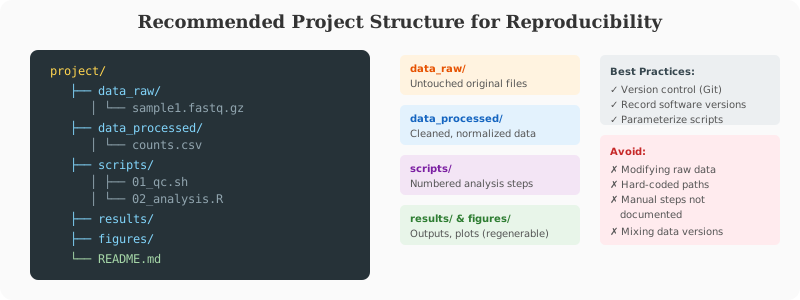
A result is reproducible when someone else can regenerate it using your code, inputs, and parameters.
Checklist:
- Record software versions.
- Save raw and processed data separately.
- Keep metadata organized.
- Parameterize scripts.
- Use a consistent folder structure.
Example project layout:
project/
  data_raw/
  data_processed/
  scripts/
  results/
  figures/
  README.md
Environments and Dependency Management
Tool version mismatch is the #1 cause of reproducibility failures. Proper environment management is essential.
Conda / Mamba for Scientific Computing
# Install miniconda/mamba
# https://docs.conda.io/en/latest/miniconda.html

# Create environment from scratch
conda create -n rnaseq python=3.10
conda activate rnaseq
conda install -c bioconda star salmon fastqc multiqc

# Create environment from file
cat > environment.yml << EOF
name: rnaseq
channels:
  - conda-forge
  - bioconda
  - defaults
dependencies:
  - python=3.10
  - star=2.7.10b
  - salmon=1.10.1
  - fastqc=0.12.1
  - multiqc=1.14
  - samtools=1.17
  - subread=2.0.3
  - pip
  - pip:
    - scanpy==1.9.3
EOF

conda env create -f environment.yml

# Export environment for sharing
conda env export > environment.yml

# Use mamba for faster installs
conda install -c conda-forge mamba
mamba install -c bioconda cellranger
Docker for Complete Reproducibility
# Dockerfile for RNA-seq analysis
FROM continuumio/miniconda3:latest

# Set up conda environment
COPY environment.yml /tmp/
RUN conda env create -f /tmp/environment.yml && \
    conda clean -a

# Activate environment by default
ENV PATH /opt/conda/envs/rnaseq/bin:$PATH

# Set working directory
WORKDIR /data

# Default command
CMD ["bash"]
# Build and run
docker build -t rnaseq-pipeline .
docker run -v $(pwd):/data rnaseq-pipeline salmon quant --help

# Use pre-built bioinformatics images
docker pull quay.io/biocontainers/salmon:1.10.1--h7e5ed60_0
Workflow Systems (Next Step)
For medium and large projects, use pipeline managers:
Snakemake Example
# Snakefile for RNA-seq pipeline
SAMPLES = ["sample1", "sample2", "sample3"]

rule all:
    input:
        "results/multiqc_report.html",
        expand("results/salmon/{sample}/quant.sf", sample=SAMPLES)

rule fastqc:
    input:
        "data/raw/{sample}_R1.fastq.gz"
    output:
        html="results/qc/{sample}_R1_fastqc.html",
        zip="results/qc/{sample}_R1_fastqc.zip"
    shell:
        "fastqc {input} -o results/qc/"

rule salmon_quant:
    input:
        r1="data/raw/{sample}_R1.fastq.gz",
        r2="data/raw/{sample}_R2.fastq.gz",
        index="reference/salmon_index"
    output:
        "results/salmon/{sample}/quant.sf"
    threads: 8
    shell:
        """
        salmon quant -i {input.index} \
            -l A -1 {input.r1} -2 {input.r2} \
            -p {threads} -o results/salmon/{wildcards.sample}
        """

rule multiqc:
    input:
        expand("results/qc/{sample}_R1_fastqc.html", sample=SAMPLES),
        expand("results/salmon/{sample}/quant.sf", sample=SAMPLES)
    output:
        "results/multiqc_report.html"
    shell:
        "multiqc results/ -o results/"
# Run Snakemake pipeline
snakemake --cores 16 --use-conda

# Visualize DAG
snakemake --dag | dot -Tpdf > dag.pdf

# Dry run
snakemake -n
Nextflow Example
// main.nf
params.reads = "data/raw/*_{R1,R2}.fastq.gz"
params.outdir = "results"

Channel
    .fromFilePairs(params.reads)
    .set { read_pairs_ch }

process FASTQC {
    publishDir "${params.outdir}/qc", mode: 'copy'

    input:
    tuple val(sample_id), path(reads)

    output:
    path "*.html"
    path "*.zip"

    script:
    """
    fastqc ${reads}
    """
}

process SALMON_QUANT {
    publishDir "${params.outdir}/salmon", mode: 'copy'
    cpus 8

    input:
    tuple val(sample_id), path(reads)
    path index

    output:
    path "${sample_id}"

    script:
    """
    salmon quant -i ${index} -l A \\
        -1 ${reads[0]} -2 ${reads[1]} \\
        -p ${task.cpus} -o ${sample_id}
    """
}

workflow {
    FASTQC(read_pairs_ch)
    SALMON_QUANT(read_pairs_ch, params.salmon_index)
}
# Run Nextflow pipeline
nextflow run main.nf -profile docker

# Resume failed run
nextflow run main.nf -resume
Which Workflow Manager to Choose?
| Feature | Snakemake | Nextflow |
|---|---|---|
| Language | Python-like | Groovy/DSL |
| Learning curve | Easier | Steeper |
| Cloud support | Good | Excellent |
| Container support | Conda, Docker | Docker, Singularity |
| Scalability | HPC, cloud | Excellent cloud-native |
| Community | Large in academia | Growing rapidly |
High-Performance Computing (HPC) Basics
Most serious bioinformatics work happens on clusters.
SLURM Job Submission
#!/bin/bash
#SBATCH --job-name=rnaseq_align
#SBATCH --partition=standard
#SBATCH --nodes=1
#SBATCH --ntasks=1
#SBATCH --cpus-per-task=16
#SBATCH --mem=64G
#SBATCH --time=24:00:00
#SBATCH --output=logs/%x_%j.out
#SBATCH --error=logs/%x_%j.err

# Load modules
module load star/2.7.10b
module load samtools/1.17

# Run alignment
STAR --runThreadN 16 \
     --genomeDir /reference/star_index \
     --readFilesIn sample_R1.fastq.gz sample_R2.fastq.gz \
     --readFilesCommand zcat \
     --outFileNamePrefix results/sample_ \
     --outSAMtype BAM SortedByCoordinate
# Submit job
sbatch align.sh

# Check job status
squeue -u $USER

# Cancel job
scancel JOB_ID

# View job details
sacct -j JOB_ID --format=JobID,JobName,State,Elapsed,MaxRSS
Array Jobs for Parallel Processing
#!/bin/bash
#SBATCH --job-name=fastqc_array
#SBATCH --array=1-20%5   # 20 jobs, max 5 concurrent
#SBATCH --cpus-per-task=2
#SBATCH --mem=4G
#SBATCH --time=1:00:00

# Get sample name from array index
SAMPLE=$(sed -n "${SLURM_ARRAY_TASK_ID}p" samples.txt)

fastqc data/raw/${SAMPLE}_R1.fastq.gz data/raw/${SAMPLE}_R2.fastq.gz \
       -o results/qc/
Summary
Strong command-line, scripting, version control, and reproducibility habits are the foundation of professional bioinformatics. These skills will make every downstream analysis faster and more reliable.
💬 Give Feedback
Help us improve! Share what worked, what was unclear, or suggest new topics.
Share Your Feedback