
Bioinformatics Data Analysis Focused (NGS)

Next-Generation Sequencing (NGS) allows high-throughput measurement of genomes, transcriptomes, and epigenomes. This chapter focuses on practical analysis steps and how to avoid common mistakes.
Learning Goals
By the end of this chapter, you should be able to:
- Describe the NGS pipeline from raw reads to biological interpretation.
- Perform core quality checks before downstream analysis.
- Distinguish DNA-seq and RNA-seq workflows.
- Understand common outputs and quality metrics.
NGS Platforms and Data Types
Illumina Short-Read Sequencing
The workhorse of modern genomics—high accuracy, short reads (50-300 bp).
| Platform | Output | Read Length | Use Cases |
|---|---|---|---|
| NovaSeq 6000 | 6 TB | 2×150 bp | Large projects, WGS |
| NextSeq 2000 | 360 GB | 2×150 bp | Mid-scale RNA-seq |
| MiSeq | 15 GB | 2×300 bp | Amplicons, small projects |
Long-Read Sequencing
| Platform | Read Length | Error Rate | Best For |
|---|---|---|---|
| PacBio HiFi | 15-20 kb | ~0.1% | Structural variants, assemblies |
| Oxford Nanopore | Up to 2 Mb | 5-15% | Real-time, field sequencing |
Common File Formats Deep Dive
# FASTQ: Raw reads with quality scores
@read_001
ATCGATCGATCGATCGATCGATCGATCGATCG
+
IIIIIIIIIIIIIIIIIIIIIIIIIIIIIIII

# Quality encoding: Phred+33 (Illumina 1.8+)
# I = ASCII 73 - 33 = Q40 (99.99% accuracy)
# ? = ASCII 63 - 33 = Q30 (99.9% accuracy)

# SAM/BAM: Aligned reads
# BAM is binary compressed; use samtools to view
samtools view -h aligned.bam | head -20

# VCF: Variant calls
#CHROM  POS     ID      REF     ALT     QUAL    FILTER  INFO
chr1    12345   .       A       G       99      PASS    DP=50;AF=0.5
Typical NGS Workflow
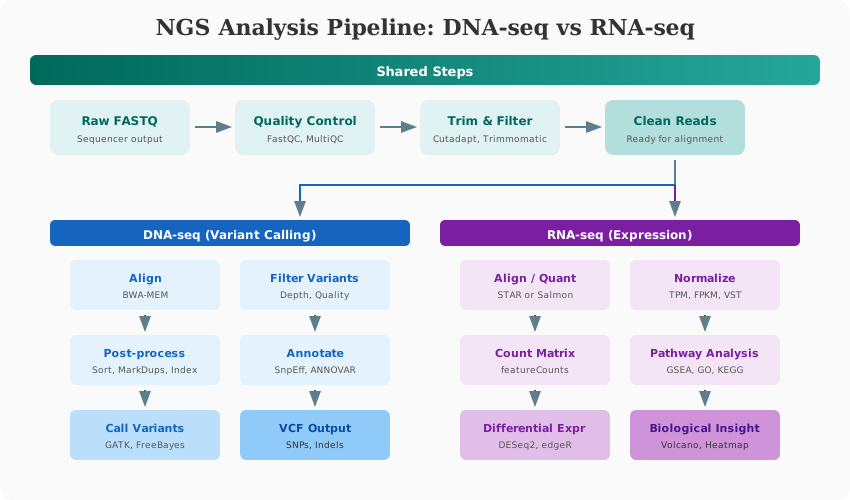
- Experimental design and metadata planning
- Sequencing and FASTQ generation
- Raw read quality control
- Trimming/filtering
- Alignment or pseudo-alignment
- Quantification or variant calling
- Statistical analysis
- Functional interpretation and reporting
Experimental Design Essentials
Good design matters more than fancy tools.
- Include biological replicates (minimum 3 per group when possible).
- Balance batches across conditions.
- Record covariates (sex, age, tissue, run, lane).
- Define the primary endpoint before analysis.
Raw Read Quality Control
FastQC is your first stop for every sequencing project.
Running FastQC
# Single file
fastqc sample_R1.fastq.gz -o qc/

# All files in parallel
fastqc data/*.fastq.gz -o qc/ -t 8

# Aggregate with MultiQC
multiqc qc/ -o qc_report/
Interpreting FastQC Reports
| Metric | Good | Problematic | Action |
|---|---|---|---|
| Per base quality | Q30+ throughout | Drops below Q20 at ends | Trim low-quality bases |
| Adapter content | <5% | Significant adapter signal | Trim adapters |
| GC content | Smooth, expected peak | Bimodal or shifted | Check contamination |
| Sequence duplication | Low (unique) | Very high | May need deduplication |
| Overrepresented seqs | None | Adapters, rRNA | Filter or investigate |
Adapter Trimming with Cutadapt
# Illumina TruSeq adapters
cutadapt \
    -a AGATCGGAAGAGCACACGTCTGAACTCCAGTCA \
    -A AGATCGGAAGAGCGTCGTGTAGGGAAAGAGTGT \
    -o trimmed_R1.fastq.gz \
    -p trimmed_R2.fastq.gz \
    --minimum-length 20 \
    --quality-cutoff 20 \
    raw_R1.fastq.gz raw_R2.fastq.gz

# Check trimming report
# Reads with adapters: X%
# Reads too short after trimming: Y%
Quality Trimming with fastp
# fastp: All-in-one preprocessing
fastp \
    -i raw_R1.fastq.gz \
    -I raw_R2.fastq.gz \
    -o clean_R1.fastq.gz \
    -O clean_R2.fastq.gz \
    --detect_adapter_for_pe \
    --cut_front --cut_tail \
    --cut_window_size 4 \
    --cut_mean_quality 20 \
    --length_required 36 \
    --html fastp_report.html \
    --json fastp_report.json
Complete RNA-Seq Analysis Tutorial
This section provides a complete, runnable RNA-seq workflow from raw reads to biological interpretation.
Step 1: Download Reference Files
# Create reference directory
mkdir -p reference && cd reference

# Download human genome and annotation (GRCh38)
wget ftp://ftp.ensembl.org/pub/release-110/fasta/homo_sapiens/dna/Homo_sapiens.GRCh38.dna.primary_assembly.fa.gz
wget ftp://ftp.ensembl.org/pub/release-110/gtf/homo_sapiens/Homo_sapiens.GRCh38.110.gtf.gz

gunzip *.gz
Step 2: Build Genome Index
# For STAR alignment
STAR --runThreadN 16 \
     --runMode genomeGenerate \
     --genomeDir reference/star_index \
     --genomeFastaFiles reference/Homo_sapiens.GRCh38.dna.primary_assembly.fa \
     --sjdbGTFfile reference/Homo_sapiens.GRCh38.110.gtf \
     --sjdbOverhang 100

# For Salmon (pseudo-alignment)
salmon index \
    -t reference/transcriptome.fa \
    -i reference/salmon_index \
    -p 16
Step 3: Align Reads (STAR)
#!/bin/bash
# align_star.sh

SAMPLE=$1
STAR --runThreadN 16 \
     --genomeDir reference/star_index \
     --readFilesIn data/clean/${SAMPLE}_R1.fastq.gz data/clean/${SAMPLE}_R2.fastq.gz \
     --readFilesCommand zcat \
     --outFileNamePrefix results/star/${SAMPLE}_ \
     --outSAMtype BAM SortedByCoordinate \
     --quantMode GeneCounts \
     --outSAMunmapped Within \
     --outSAMattributes NH HI AS NM MD

# Index the BAM
samtools index results/star/${SAMPLE}_Aligned.sortedByCoord.out.bam

# Run for all samples
for sample in sample1 sample2 sample3; do
    bash align_star.sh $sample
done
Step 4: Quantification with featureCounts
# Count reads per gene
featureCounts \
    -T 16 \
    -p --countReadPairs \
    -a reference/Homo_sapiens.GRCh38.110.gtf \
    -o results/counts/gene_counts.txt \
    results/star/*_Aligned.sortedByCoord.out.bam

# Output: gene_counts.txt with counts per gene per sample
Alternative: Salmon Pseudo-alignment
# Faster, alignment-free quantification
for sample in sample1 sample2 sample3; do
    salmon quant \
        -i reference/salmon_index \
        -l A \
        -1 data/clean/${sample}_R1.fastq.gz \
        -2 data/clean/${sample}_R2.fastq.gz \
        -p 16 \
        -o results/salmon/${sample} \
        --validateMappings \
        --gcBias \
        --seqBias
done
Step 5: Differential Expression with DESeq2
# Complete DESeq2 analysis
library(DESeq2)
library(tidyverse)
library(pheatmap)
library(EnhancedVolcano)

# Load count matrix
counts <- read.table("results/counts/gene_counts.txt",
                     header = TRUE, row.names = 1, skip = 1)
counts <- counts[, 7:ncol(counts)]  # Remove annotation columns
colnames(counts) <- gsub("_Aligned.sortedByCoord.out.bam", "", colnames(counts))

# Sample metadata
coldata <- data.frame(
  sample = c("sample1", "sample2", "sample3", "sample4", "sample5", "sample6"),
  condition = factor(c("control", "control", "control", "treatment", "treatment", "treatment")),
  row.names = c("sample1", "sample2", "sample3", "sample4", "sample5", "sample6")
)

# Create DESeq2 object
dds <- DESeqDataSetFromMatrix(
  countData = counts,
  colData = coldata,
  design = ~ condition
)

# Pre-filtering: keep genes with at least 10 reads across samples
keep <- rowSums(counts(dds)) >= 10
dds <- dds[keep, ]

# Run differential expression
dds <- DESeq(dds)

# Extract results
res <- results(dds, contrast = c("condition", "treatment", "control"))
res <- res[order(res$padj), ]

# Summary
summary(res, alpha = 0.05)

# Save results
res_df <- as.data.frame(res)
res_df$gene_id <- rownames(res_df)
write.csv(res_df, "results/de/deseq2_results.csv", row.names = FALSE)

# Count significant genes
sum(res$padj < 0.05 & abs(res$log2FoldChange) > 1, na.rm = TRUE)
Step 6: Visualization
# PCA plot
vsd <- vst(dds, blind = FALSE)
pcaData <- plotPCA(vsd, intgroup = "condition", returnData = TRUE)
percentVar <- round(100 * attr(pcaData, "percentVar"))

ggplot(pcaData, aes(PC1, PC2, color = condition, label = name)) +
  geom_point(size = 4) +
  geom_text_repel() +
  xlab(paste0("PC1: ", percentVar[1], "% variance")) +
  ylab(paste0("PC2: ", percentVar[2], "% variance")) +
  theme_minimal(base_size = 14) +
  scale_color_brewer(palette = "Set1")

ggsave("results/figures/pca_plot.pdf", width = 8, height = 6)

# Volcano plot
EnhancedVolcano(res,
    lab = rownames(res),
    x = 'log2FoldChange',
    y = 'padj',
    pCutoff = 0.05,
    FCcutoff = 1,
    title = 'Treatment vs Control',
    subtitle = 'Differential Expression Analysis')

ggsave("results/figures/volcano_plot.pdf", width = 10, height = 8)

# Heatmap of top genes
top_genes <- head(rownames(res[order(res$padj), ]), 50)
mat <- assay(vsd)[top_genes, ]
mat <- t(scale(t(mat)))

pheatmap(mat,
         annotation_col = coldata[, "condition", drop = FALSE],
         show_rownames = TRUE,
         cluster_cols = TRUE,
         cluster_rows = TRUE,
         fontsize_row = 8)
Step 7: Pathway Analysis
library(clusterProfiler)
library(org.Hs.eg.db)

# Get significant genes
sig_genes <- res_df %>%
  filter(padj < 0.05, abs(log2FoldChange) > 1) %>%
  pull(gene_id)

# Convert to Entrez IDs
gene_list <- bitr(sig_genes,
                  fromType = "ENSEMBL",
                  toType = "ENTREZID",
                  OrgDb = org.Hs.eg.db)

# GO enrichment
go_bp <- enrichGO(gene = gene_list$ENTREZID,
                  OrgDb = org.Hs.eg.db,
                  ont = "BP",
                  pAdjustMethod = "BH",
                  pvalueCutoff = 0.05)

# Visualize
dotplot(go_bp, showCategory = 20)
ggsave("results/figures/go_enrichment.pdf", width = 10, height = 12)

# KEGG pathway analysis
kegg <- enrichKEGG(gene = gene_list$ENTREZID,
                   organism = 'hsa',
                   pvalueCutoff = 0.05)

dotplot(kegg, showCategory = 15)

# Gene Set Enrichment Analysis (GSEA)
library(fgsea)

# Create ranked list
ranks <- res_df %>%
  filter(!is.na(log2FoldChange)) %>%
  arrange(desc(log2FoldChange)) %>%
  deframe()  # Named vector: gene -> log2FC

# Load MSigDB gene sets
pathways <- gmtPathways("msigdb/h.all.v2023.2.Hs.symbols.gmt")

# Run GSEA
fgsea_res <- fgsea(pathways = pathways,
                   stats = ranks,
                   minSize = 15,
                   maxSize = 500,
                   nperm = 10000)

# Top enriched pathways
fgsea_res %>%
  arrange(pval) %>%
  head(20)
Complete DNA-Seq Variant Calling Tutorial
Step 1: Align Reads with BWA-MEM
# Index reference
bwa index reference/GRCh38.fa

# Align reads
bwa mem -t 16 -R "@RG\tID:sample1\tSM:sample1\tPL:ILLUMINA" \
    reference/GRCh38.fa \
    data/clean/sample1_R1.fastq.gz \
    data/clean/sample1_R2.fastq.gz \
    | samtools sort -@ 8 -o results/bam/sample1.sorted.bam

# Index BAM
samtools index results/bam/sample1.sorted.bam
Step 2: Mark Duplicates
# Using Picard
gatk MarkDuplicates \
    -I results/bam/sample1.sorted.bam \
    -O results/bam/sample1.markdup.bam \
    -M results/qc/sample1.dup_metrics.txt \
    --REMOVE_DUPLICATES false

samtools index results/bam/sample1.markdup.bam
Step 3: Base Quality Score Recalibration (BQSR)
# Known sites for recalibration
KNOWN_SITES="--known-sites reference/dbsnp_146.hg38.vcf.gz \
             --known-sites reference/Mills_and_1000G_gold_standard.indels.hg38.vcf.gz"

# Generate recalibration table
gatk BaseRecalibrator \
    -I results/bam/sample1.markdup.bam \
    -R reference/GRCh38.fa \
    $KNOWN_SITES \
    -O results/bqsr/sample1.recal_data.table

# Apply recalibration
gatk ApplyBQSR \
    -I results/bam/sample1.markdup.bam \
    -R reference/GRCh38.fa \
    --bqsr-recal-file results/bqsr/sample1.recal_data.table \
    -O results/bam/sample1.final.bam
Step 4: Variant Calling with GATK HaplotypeCaller
# Call variants
gatk HaplotypeCaller \
    -R reference/GRCh38.fa \
    -I results/bam/sample1.final.bam \
    -O results/vcf/sample1.raw.vcf.gz \
    --native-pair-hmm-threads 8

# For multiple samples: joint calling with GenomicsDB
# First, create genomics database
gatk GenomicsDBImport \
    -V sample1.g.vcf.gz \
    -V sample2.g.vcf.gz \
    -V sample3.g.vcf.gz \
    --genomicsdb-workspace-path genomicsdb \
    -L intervals.bed

# Joint genotyping
gatk GenotypeGVCFs \
    -R reference/GRCh38.fa \
    -V gendb://genomicsdb \
    -O results/vcf/cohort.raw.vcf.gz
Step 5: Variant Filtering
# Hard filtering for SNPs
gatk SelectVariants \
    -V results/vcf/cohort.raw.vcf.gz \
    -select-type SNP \
    -O results/vcf/snps.raw.vcf.gz

gatk VariantFiltration \
    -V results/vcf/snps.raw.vcf.gz \
    -filter "QD < 2.0" --filter-name "QD2" \
    -filter "QUAL < 30.0" --filter-name "QUAL30" \
    -filter "SOR > 3.0" --filter-name "SOR3" \
    -filter "FS > 60.0" --filter-name "FS60" \
    -filter "MQ < 40.0" --filter-name "MQ40" \
    -O results/vcf/snps.filtered.vcf.gz

# Extract PASS variants only
bcftools view -f PASS results/vcf/snps.filtered.vcf.gz \
    -o results/vcf/snps.final.vcf.gz
Step 6: Variant Annotation
# Annotate with SnpEff
snpeff -v GRCh38.105 results/vcf/snps.final.vcf.gz \
    > results/vcf/snps.annotated.vcf

# Annotate with VEP (Ensembl Variant Effect Predictor)
vep --input_file results/vcf/snps.final.vcf.gz \
    --output_file results/vcf/snps.vep.vcf \
    --cache --offline \
    --assembly GRCh38 \
    --everything \
    --vcf

# ANNOVAR for clinical annotation
perl annovar/table_annovar.pl \
    results/vcf/snps.final.vcf humandb/ \
    -buildver hg38 \
    -out results/annotation/sample1 \
    -protocol refGene,clinvar_20230416,gnomad40_exome \
    -operation g,f,f \
    -nastring . \
    -vcfinput
Core Quality Checks Before Interpretation
- Are replicates clustering by condition?
- Any obvious outliers?
- Are batch effects dominating PCA?
- Is sequencing depth sufficient for the question?
Common Pitfalls in NGS Analysis
- Treating technical replicates as biological replicates
- Ignoring sample swaps or contamination
- Using uncorrected p-values across thousands of tests
- Over-interpreting low-depth variants
- Skipping metadata quality checks
Minimal Command-line Example
# 1) Run FastQC on all reads
fastqc data/*.fastq.gz -o qc/

# 2) Aggregate reports
multiqc qc/ -o qc_summary/

# 3) Example alignment (RNA-seq with STAR)
STAR --genomeDir ref/star_index \
     --readFilesIn sample_R1.fastq.gz sample_R2.fastq.gz \
     --readFilesCommand zcat \
     --outFileNamePrefix results/sample_
Beyond Bulk NGS
Other important analysis areas:
ChIP-seq Analysis
ChIP-seq identifies protein-DNA binding sites (transcription factors, histone modifications).
# Align reads
bowtie2 -p 16 -x reference/bowtie2_index \
    -1 chip_R1.fastq.gz -2 chip_R2.fastq.gz \
    | samtools sort -o chip.bam

# Remove duplicates
picard MarkDuplicates I=chip.bam O=chip.dedup.bam REMOVE_DUPLICATES=true

# Call peaks with MACS2
macs2 callpeak \
    -t chip.dedup.bam \
    -c input.dedup.bam \
    -f BAMPE \
    -g hs \
    -n sample1 \
    --outdir results/peaks \
    -q 0.05

# For broad marks (H3K27me3, H3K9me3)
macs2 callpeak -t chip.bam -c input.bam -f BAMPE -g hs --broad -n h3k27me3
# Differential binding analysis with DiffBind
library(DiffBind)

# Load sample sheet
samples <- read.csv("samples.csv")
dba <- dba(sampleSheet = samples)

# Count reads in peaks
dba <- dba.count(dba)

# Establish contrast
dba <- dba.contrast(dba, categories = DBA_CONDITION)

# Differential analysis
dba <- dba.analyze(dba)

# Get results
results <- dba.report(dba)
ATAC-seq Analysis
ATAC-seq maps chromatin accessibility (open chromatin regions).
# Align with Bowtie2 (remove mitochondrial reads)
bowtie2 -p 16 -X 2000 --very-sensitive \
    -x reference/bowtie2_index \
    -1 atac_R1.fastq.gz -2 atac_R2.fastq.gz \
    | samtools view -@ 4 -bS - \
    | samtools sort -@ 4 -o atac.sorted.bam

# Remove mitochondrial reads
samtools view -h atac.sorted.bam | grep -v chrM | samtools sort -o atac.noMT.bam

# Remove duplicates
picard MarkDuplicates I=atac.noMT.bam O=atac.final.bam REMOVE_DUPLICATES=true

# Shift reads for Tn5 insertion (critical for ATAC-seq!)
alignmentSieve -b atac.final.bam -o atac.shifted.bam --ATACshift

# Call peaks
macs2 callpeak -t atac.shifted.bam -f BAMPE -g hs \
    --nomodel --shift -100 --extsize 200 \
    -n atac_sample -q 0.05
Long-Read Sequencing Analysis
# PacBio HiFi alignment with minimap2
minimap2 -ax map-hifi -t 16 reference.fa reads.fastq.gz \
    | samtools sort -o aligned.bam

# Oxford Nanopore alignment
minimap2 -ax map-ont -t 16 reference.fa reads.fastq.gz \
    | samtools sort -o aligned.bam

# Structural variant calling with Sniffles2
sniffles --input aligned.bam --vcf sv.vcf.gz --reference reference.fa

# Isoform detection with IsoQuant
isoquant.py --reference reference.fa \
    --genedb annotation.gtf \
    --bam aligned.bam \
    --output isoquant_results \
    --data_type pacbio_ccs
Quality Control Metrics Reference
| Analysis Type | Key QC Metrics | Acceptable Thresholds |
|---|---|---|
| RNA-seq | Mapping rate | >70% (ideally >80%) |
| rRNA contamination | <10% | |
| Gene body coverage | Even 5’ to 3’ | |
| Duplicates | <60% | |
| DNA-seq | Mapping rate | >95% |
| Duplicates | <30% | |
| Coverage uniformity | CV <0.3 | |
| Insert size | Expected distribution | |
| ChIP-seq | FRiP (Fraction in Peaks) | >1% (TF), >5% (histone) |
| NSC/RSC | RSC >1 | |
| PCR bottleneck coefficient | >0.8 | |
| ATAC-seq | TSS enrichment | >5 |
| Fragment size distribution | Clear nucleosome pattern | |
| mitochondrial % | <20% |
Troubleshooting Common Issues
Low Mapping Rate
- Check for contamination (BLAST unmapped reads)
- Verify correct reference genome
- Check for adapter contamination
High Duplicate Rate
- May indicate low library complexity
- Consider PCR-free library prep
- Check starting material quality
Batch Effects in PCA
- Include batch as covariate in model
- Consider ComBat or similar correction
- Verify balanced experimental design
No Significant DE Genes
- Check for sample swaps (correlation heatmap)
- Verify adequate sequencing depth
- Review biological vs technical replicates
Summary
Reliable NGS analysis depends on design quality, robust QC, and careful interpretation. If QC and metadata are handled well, downstream statistical findings become far more trustworthy. Master these workflows and you’ll be ready for any sequencing project.
💬 Give Feedback
Help us improve! Share what worked, what was unclear, or suggest new topics.
Share Your Feedback